
From ByteMind Ltd

Proofread faster.
Edit with confidence.

ByteProof proofreads the text you select. In Word, edits arrive as tracked changes. In any other app, your selection is replaced with the polished version.

7-day free trial No subscription Private local AI included macOS & Windows
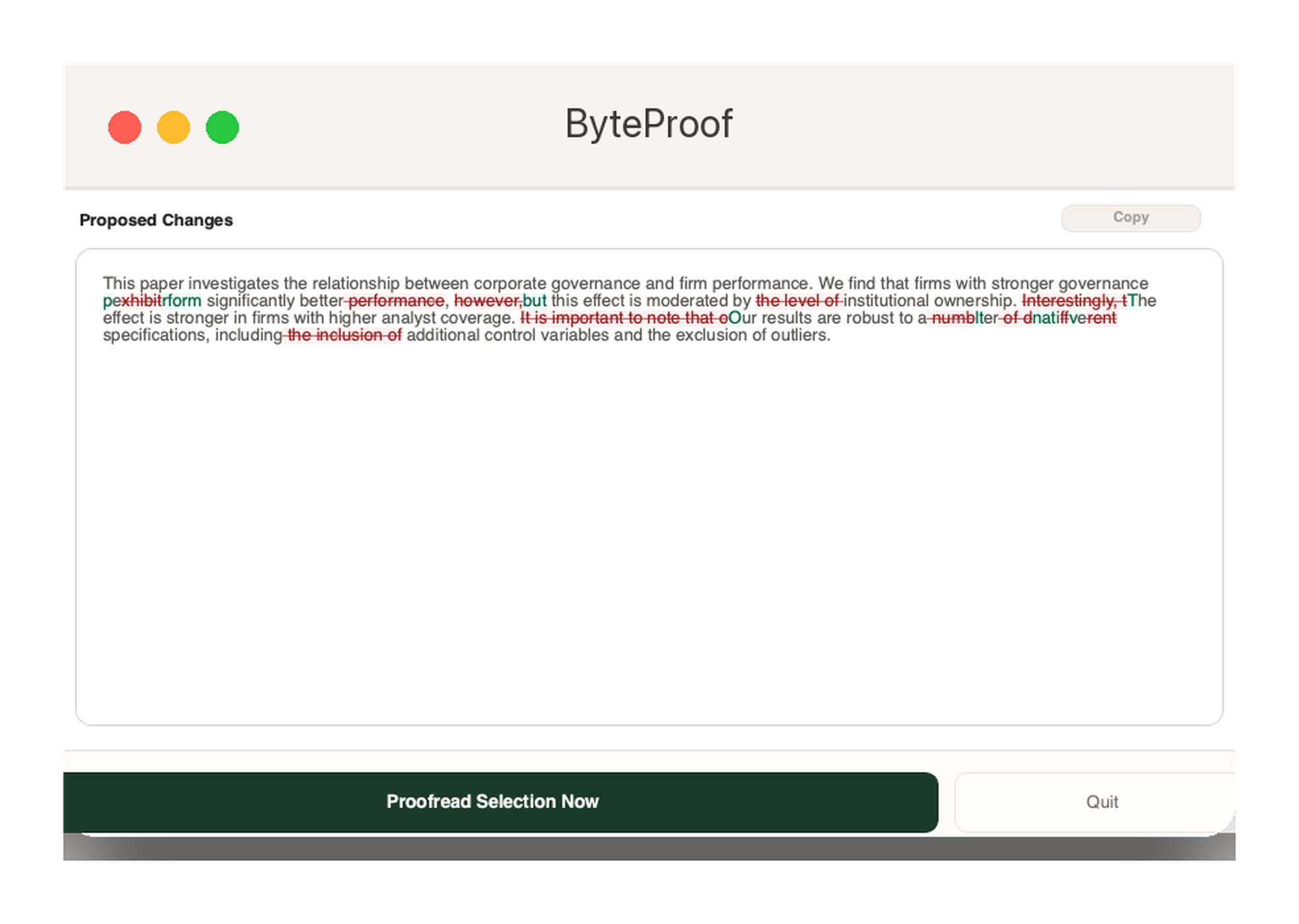
ByteProof window showing proposed proofreading changes with tracked edits highlighted Tracked changes in Word Polishes text in any app Cmd+Shift+' to proofread

Local AI included, or bring your own model

Local AI (Qwen3) DeepSeek OpenAI Anthropic Google Gemini xAI Groq Perplexity Ollama (local)
How it works

Select. Review. Apply.

Three steps, one hotkey. Each clip below is the real app, about three seconds long.

1

Select the text, press the hotkey

Cmd+Shift+' on a Mac, Ctrl+Shift+' on Windows. ByteProof reads the words around your selection too.

The panel appears next to the text, then fills in the suggestions.
2

Review every change

Each suggestion shows the original, the replacement, and a short reason. Apply the ones you want, or dismiss the rest.

One change applied from the list of three. The rest wait for you.
3

Apply all — or undo

Apply every change in one click. If you change your mind, Undo puts the original text back.

Applied, then undone. Both are one click.
Two modes

Word, or everywhere else.

ByteProof detects what you are working in and adapts. The hotkey is the same either way.

Microsoft Word — tracked changes

For papers, theses and reports where every edit has to be visible.

  • Each edit arrives as a tracked change you can accept or reject.
  • Optional comments explain the reasoning.
  • Citations, equations and tables are left alone.

Any other app — clean text

Email, browsers, editors, chat. Select, press the hotkey, and read the suggestion.

  • Problem phrases are underlined as you work.
  • The selected text is replaced with the polished version.
  • Tone and meaning stay as you wrote them.
Before and after

See the difference.

Four kinds of writing. ByteProof keeps your meaning and cuts what gets in the way.

Academic journal

For a manuscript heading to a top-tier journal: wordy phrasing trimmed, argument untouched.

Before

"We utilise a range of methods in order to examine the relationship due to the fact that the data is limited."

After

"We use a range of methods to examine the relationship because the data is limited."

Three phrases cut. The finding is unchanged.

General email

A routine team email: filler removed, tone kept friendly.

Before

"Hi team, the meeting has been rescheduled to Thursday at 10am instead of Wednesday. Sorry for any inconvenience. The agenda has been updated and is in the shared folder if you want to look before the meeting."

After

"Hi team, the meeting has moved to Thursday at 10 am instead of Wednesday. Apologies for the inconvenience. The agenda is updated and in the shared folder, so you can review it beforehand."

Shorter, still friendly, ready to send.

PhD thesis

A chapter draft: your voice and your argument stay, repetition goes.

Before

"To examine the relationship between corporate governance and firm value, this chapter draws on agency theory. The analysis focuses on the role of independent directors and how their presence affects monitoring quality."

After

"To examine the relationship between corporate governance and firm value, this chapter draws on agency theory. It focuses on independent directors and how their presence affects monitoring quality."

Meaning and voice kept; the repeated clause removed.

General language editing

A professional letter: formal, and clear about what you want.

Before

"Your account shows an outstanding balance of $450, overdue since 1 March. Please pay as soon as you can. If you have any questions, contact our accounts team."

After

"Your account has an outstanding balance of $450, overdue since 1 March. Please arrange payment at your earliest convenience. If you have any questions, please contact our accounts team."

Formal, direct, no filler.

What you get

Built for careful writing.

Small mistakes matter in academic and professional work. ByteProof is made for that.

Tracked changes in Word

Every edit lands as a tracked change. Accept or reject each one.

Comments when you want them

Short notes explain why a change was made, instead of quietly rewriting your work.

Citations, math & tables protected

References, equations and tables are kept as they are.

Reads around your selection

Tone, references and meaning stay consistent with the rest of the document.

Your choice of AI

Connect DeepSeek, OpenAI, Anthropic, Google Gemini, xAI, Groq, Perplexity or your own Ollama server.

Private local AI included

ByteProof runs a small Qwen3 model on your computer. It works offline, with no account and no API key.

Also included: UK / AU / NZ or US spelling, precise or creative editing styles, adjustable creativity, per-provider model choice, and a Test Connection button for every provider.

AI and privacy

Private by default. Your choice of model.

Proofreading runs on your computer with the included local model. Nothing is sent anywhere unless you connect a cloud provider yourself.

The local model is the default

Download it once, then it works offline. No account, no API key, and no text leaving your computer.

One download, then every proofread runs offline.

Or use the model you already pay for

Pick a provider in Settings and paste your own key. You can switch back to local at any time.

One click switches provider. Keys stay on your computer.

With local AI, your text is processed on your computer and never leaves it. If you connect a cloud provider, only the text you select is sent, using your own key.

Get ByteProof

Start your free trial.

7 days, every feature, no credit card. macOS and Windows.

macOS: if it says ByteProof can't be verified, open System Settings → Privacy & Security, click Open Anyway next to ByteProof, then confirm. Once only.

Windows: if SmartScreen appears, click More info Run anyway. A Microsoft Store version that installs without this step is in preparation.

Installers are hosted on GitHub Releases and update themselves. Questions? bytemind.nz@gmail.com.

Founding price

Buy once. No subscription.

ByteProof is built by one developer. The founding price is for the people who back it early.

Start free

Free Trial

7 days

Everything included, no credit card

  • Every Word and any-app feature
  • Private local AI, or your own cloud key
  • Global hotkeys on macOS and Windows
  • Limited free mode after the trial
Download free trial

Activation takes a minute

Polar emails your key after checkout. Open ByteProof, go to Settings → License, and paste it in. Move the licence to another computer from the same page.

Paste the key once. The app takes it from there.

Secure checkout via Polar. Questions? bytemind.nz@gmail.com.

Watch it work

The full walkthrough.

Or jump straight to the 60-second Word demo or the 2-minute setup guide.

Tracked changes, reviewer comments and any-app polish, end to end.

Word, in 60 seconds

Tracked changes and comments in Microsoft Word.

Setup, in 2 minutes

Install, permissions, and choosing your AI.

Questions

Common questions.

Anything else, email bytemind.nz@gmail.com.

How does ByteProof work? +

Select the text, then press the hotkey — Cmd+Shift+' on macOS, Ctrl+Shift+' on Windows. The suggestions appear in ByteProof's panel.

In Word they become tracked changes. Anywhere else, the selected text is replaced with the polished version.

Which AI models can I use? +

ByteProof's own local model by default: a Qwen3 model that runs on your computer, sized to suit your RAM. No account, no API key.

You can also connect DeepSeek, OpenAI, Anthropic, Google Gemini, xAI, Groq, Perplexity or Ollama.

Is my writing private? +

With local AI, yes. Your text is processed on your computer and never leaves it.

If you connect a cloud provider, only the text you select is sent, using your own key.

Do I need Microsoft Word, and does it work on Windows? +

Word is only needed for tracked changes, and it works on macOS and Windows, comments included.

Without Word, ByteProof still polishes text you select in email, browsers, editors and other applications.

What are the system requirements? +

macOS on Apple Silicon or Intel, or Windows 10 / 11. Local AI recommends 8 GB RAM or more; the app picks the model for your machine.

On macOS, grant Accessibility permission when asked, so the hotkey and Word integration can work.

How much does it cost? +

7 days free with every feature, then a limited free mode (local AI, 3 proofreads a day) if you do nothing.

A licence is a one-time NZ$49, GST included, and unlocks everything. No subscription.

How do I activate my license? +

Polar emails your key after checkout. Open ByteProof → Settings → License → "Already Paid? Activate with License Key", and paste it in.

One licence covers 2 computers. To move machines, choose "Deactivate This Computer" on the old one first.

macOS says it can't verify ByteProof — is it safe? +

Yes. ByteProof is built and signed by ByteMind Ltd; the warning appears while Apple's notarization completes.

To open it the first time: System Settings → Privacy & Security, scroll to Security, click Open Anyway next to ByteProof, then confirm.

What if I need help? +

Email bytemind.nz@gmail.com. ByteMind Ltd is a New Zealand registered company and answers directly.