Products · ByteMail

Reply without writing it from scratch

Select the email you need to answer and press one key. ByteMail writes the reply the way you would have. Anything it cannot know stays a field for you to fill in — so nothing is invented.

macOS 13 or later · Windows 10 and 11 · no account, and it never sends mail
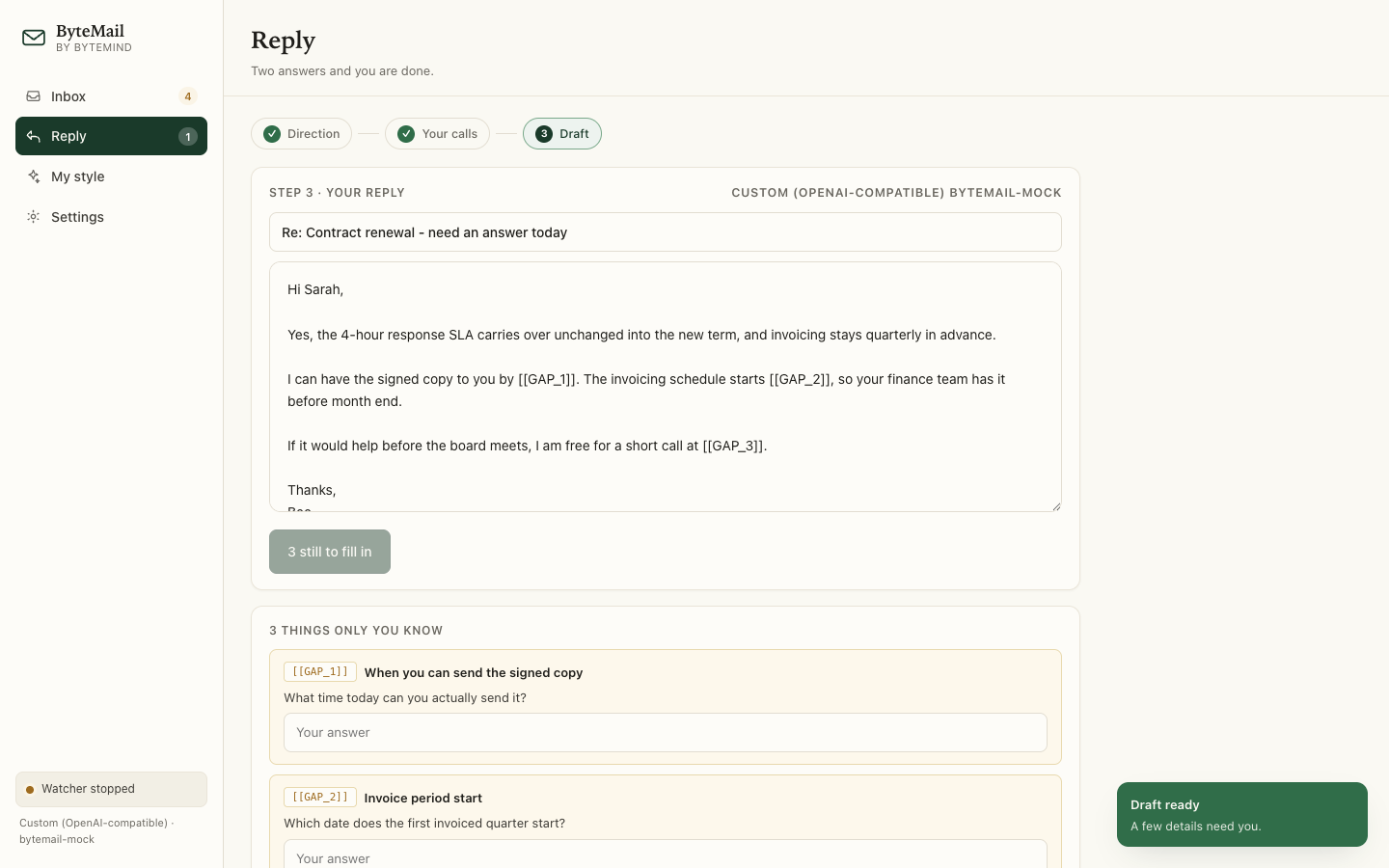
ByteMail's panel open over an email, showing a drafted reply with one field left for the facts only the user knows
The draft, with the gaps still to fill and the questions about them underneath.
Answering mail

Three things it does

Each clip below is the app, two to three seconds long.

Draft the reply

Select the email, press ⌥⌘R, and the reply streams in — in the word processor, the browser, wherever the email is sitting.

  • Reads the text around your selection, so it knows who asked what
  • Writes as you, from samples of your own sent mail
  • Copy it, or insert it straight over the text you selected
The email, read and answered in one pass.

Leave the facts to you

A date, a price, a promise, a name — anything it cannot know becomes a labelled field inside the draft.

  • Each field names exactly what is missing
  • Copy stays disabled until every one is answered
  • A fact that changes — a rate, a threshold, a deadline — can be looked up on the spot, with the pages it came from
One answer in. The button counts what is left.

Learn your voice

Paste a few emails you wrote. ByteMail picks up your greeting, your sign-off, your sentence length, and the habits to leave out.

  • The description of your style is about a kilobyte
  • Replies you approve replace samples, they do not pile up
Your samples above, and the traits learned from them.

These clips are recorded from the app's own screen. The macOS build puts the same steps behind one shortcut and a panel over your email.

The whole flow

One reminder, three steps, one paste

Nothing else is asked of you.

Step What you do
1. Direction Pick one of two to four genuinely different replies — Confirm both, Offer a call.
2. Your calls Answer two or three questions. Most are one click each.
3. Draft Read it, fill anything only you know, copy it.
Why it is different

Why it is not just a chat box

A chat window does not know it is answering an email. ByteMail does.

  A chat panel ByteMail
Knows it is emailNoRegister, length, greeting, sign-off
Writes as youNoLearned from your own samples
Knows who you areNoRole, company, seniority from your profile
Missing factsInvents themLabelled fields, and Copy blocked
Reads the threadNoThe text around your selection

You can check the gate yourself. The app carries a diagnostic that needs no API key and no network — --contracttest — and it fails if a filled field stops unlocking Copy.

What it will not do

  • It never sends mail. It hands you text to paste into the app you already trust.
  • It will not guess a fact. No date, price or promise is written unless you put it there.
  • It says when it is unsure. Anything that needs checking becomes a note naming the fact, the place and the period — and a Search the web button that returns the answer with its sources. Nothing is written in until you press Use this answer.

Where it runs

  • The macOS app lives in the menu bar. One key, a panel over your email.
  • The Windows app reaches the same result through its own window.
  • Only what you send. Nothing leaves the machine except the request to the model you chose.
Your mail

Your mail stays yours

No ByteMind account. No server of ours in the path.

5.4 MBthe whole macOS app
1 KBwhat it keeps to describe your writing
0accounts, and no telemetry
1network call: your model provider — and a search only when you ask for one

Where things are kept

API keys go in the macOS Keychain, or Windows' own protected store. Your profile and styles live in the app's own folder. There is no ByteMind account to make.

What it will not read

It reads the text you select and the text around it. Nothing else on your screen, and no mailbox it was not pointed at. Images in mail are stripped, and it tells you how many it removed.

Get ByteMail

Download

Free, and no account to make.

macOS 13 or later

Apple Silicon and Intel. Disk image — open it and drag ByteMail to Applications.

Download for macOS

ByteMail 1.3.0 · 1.7 MB · signed as ByteMind Ltd and notarized by Apple

Windows 10 and 11

ZIP package — extract it and run ByteMail.exe.

Download for Windows

ByteMail for Windows 1.3.0 · 64-bit · 38 MB

Checksums, to confirm what you received

bbb6c27b…9a100ebb macOS · 79b125f5…44f0e2ea Windows

Updates install themselves

  • ByteMail checks for a newer version every few hours and tells you when there is one.
  • Clicking install downloads it, checks it, replaces the app and starts it again.
  • The Accessibility permission is kept, because the new version is signed by the same certificate as the old one.

Before you install

  • macOS: ByteMail is signed as ByteMind Ltd and notarized by Apple, so it opens without any detour. Coming from 1.1.0, the Accessibility grant is asked for once more — this build is the first signed by the Developer ID — and every update after it keeps the grant.
  • macOS: ByteMail needs Accessibility access to read the text you select and put the reply back. Settings shows this under Permissions, with a clipboard fallback if you would rather not grant it.
  • Windows: if SmartScreen appears, click More info then Run anyway.
  • Both: bring your own model key, or point it at a local model and use no key at all. Look-ups are optional: without a search key, the question simply stays yours to answer.

Paste in a real email

The demo inbox lets you click through the whole flow with no account and no key.

Ask a question